
Choosing cloud is not only about cost or brand. It is about who manages which parts of the stack—hardware, virtualization, operating system, runtime, scaling, application code, and your business data. Google Cloud’s overview of PaaS, IaaS, and SaaS describes these as service models with different levels of control and responsibility; the ideas below apply to any major provider (Google Cloud, AWS, Azure, or local hosting partners).
What the models mean in practice
Infrastructure as a service (IaaS) rents compute, storage, and networking. You still manage the operating system, middleware, runtimes, applications, and data. You get flexibility similar to your own data center without buying physical servers.
Platform as a service (PaaS) adds a managed environment to build and run applications. You bring code and data; the provider maintains much of the runtime, scaling, and underlying platform. Examples in Google’s material include managed app platforms and serverless containers.
Software as a service (SaaS) delivers a complete application—updates, availability, and much of the stack are the vendor’s job. Users typically access it in a browser. You remain responsible for how you use the product, your accounts, and often the data you store in it.
Containers as a service (CaaS) sits between IaaS and PaaS: you package apps in containers; the provider runs orchestration and cluster infrastructure. It suits teams moving to microservices without managing every VM by hand.
Shared responsibility: one picture
The same application can be “cloud” while your team still owns patching, backups, or scaling—depending on the model. The matrix below is a practical way to compare who manages each layer (adapted from common industry diagrams; see Google Cloud’s PaaS vs IaaS vs SaaS guide for provider-specific detail).
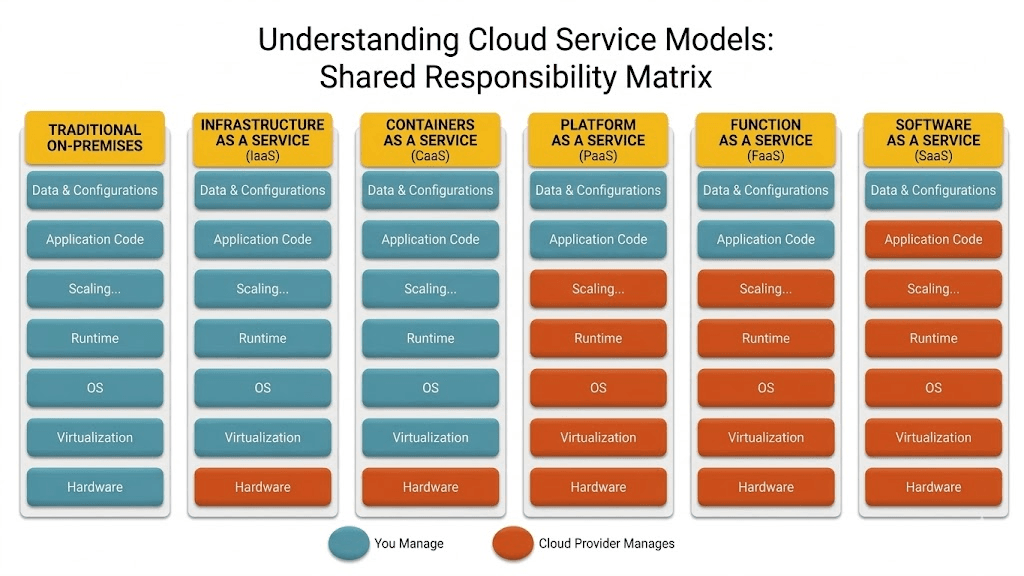
Read the chart from on-premises (you manage everything) toward SaaS (the provider manages most of the stack). Your job shrinks as you move right—but so does your ability to customize low-level behavior.
How Sri Lankan organizations typically decide
Choose IaaS when you need full control: custom networking, specific OS versions, licensed software, or lifting legacy systems with minimal change. Finance, logistics, and government-adjacent workloads often start here when compliance or existing VMs matter.
Choose PaaS or CaaS when you are building new software and want faster delivery. Product teams in Colombo and regional hubs often use PaaS for customer portals, APIs, and internal dashboards so engineers focus on features—not kernel patches.
Choose SaaS when the problem is standard and a mature product exists: accounting, HR, email, or CRM. Pay for seats or usage; integrate with your custom systems via APIs rather than rebuilding the same capability.
Combine models deliberately. A retailer might use SaaS for POS, PaaS for a custom inventory API, and IaaS for a reporting database—each choice should have a named owner for security, backups, and cost.
Pros and cons (summary)
| Model | Strengths | Trade-offs | |-------|-----------|------------| | IaaS | Maximum control, portable VMs, pay-as-you-go capacity | You operate and secure more of the stack | | CaaS | Portable containers, good for microservices | Orchestration skills; shared-kernel security awareness | | PaaS | Fast development, managed runtime and scale | Less low-level control; possible vendor constraints | | SaaS | Fastest time to value, provider maintains app | Limited customization; integration and data exit planning |
Google’s article also notes that models are not mutually exclusive—hybrid and multi-cloud setups are normal.
A simple decision path
- List workloads (customer-facing app, internal tool, legacy ERP, data warehouse).
- Mark non-negotiables (data residency, uptime, integrations, team skills).
- Assign a model per workload, not one label for the whole company.
- Document responsibility for backups, patching, identity, and incident response per workload.
- Review quarterly as traffic and compliance requirements change.
Where Ryzoe fits
We help Sri Lankan teams design and build on cloud—whether that means architecting on IaaS, shipping on PaaS or Kubernetes (CaaS), or integrating with SaaS products you already pay for. If you are unsure which model fits your next release, talk to us about cloud solutions or custom software delivery.
Further reading: PaaS vs IaaS vs SaaS — Google Cloud (service definitions, housing analogy, and product examples).